What constitutes as print-ready artwork?
This may well vary from printer to printer, but for us, we would like the following:
- A PDF document, ideally based on the PDF/X-1a standard, otherwise using 'Commercial Press' or the highest quality print setting that your software allows. You may need to open an Options or Settings window to select a higher option.
- Individual pages, not spreads/pairs (we will impose your file accordingly).
- Pages in logical sequence (1,2,3... or front cover, inside front cover, text page 1...).
- Artwork at the correct size that will not require scaling or dare we day it, squashing to fit.
- If your job is folded, we advise you to work from one of our templates to ensure it will fold correctly. You can find our template page here.
- The resolution of all images in your document should be at least 300dpi at the correct size. Images should be your own property or licensed from stock libraries. Never simply 'take' an image from a random website as they are usually low resolution and may put you at risk of a copyright claim!
- Include 3mm of bleed. If your project is to be folded/perforated/other form of critical finishing, you can extend the bleed area further to show any relevant marks BEYOND the 3mm bleed area.
- Most jobs are printed in full colour. You may supply RGB files and we will convert to CMYK before printing...
- If you are using spot colours, spot UV varnish, foiling, embossing, cutter guides, or any other embellishments, these need to be supplied with your artwork, and either supplied as 100% Black on a separate page, or setup as spot colours. The beauty of PDF/X-1a standard is that it supports spot colours.
- Ideally include crop/trim marks if your software allows. These should be offset by 3mm (any closer to the page edge and it defeats the object of the bleed). Please extend the bleed area to allow for any manually placed marks which need to be added, such as for folding or perforating.
If you do not supply your artwork as requested, there will be a minimum charge of £30 to fix your file.
If you are unsure, you can also purchase the Artwork Fix option when ordering from our store.
Software Specific Instructions
Adobe Creative Cloud
InDesign — go to File > Adobe PDF Presets > [PDF/X-1a:2001].
Illustrator — go to File > Save As > Format: Adobe PDF (pdf) > [PDF/X-1a:2001].
Both programs will bring you to the same screen. Adjust the settings to look as below.
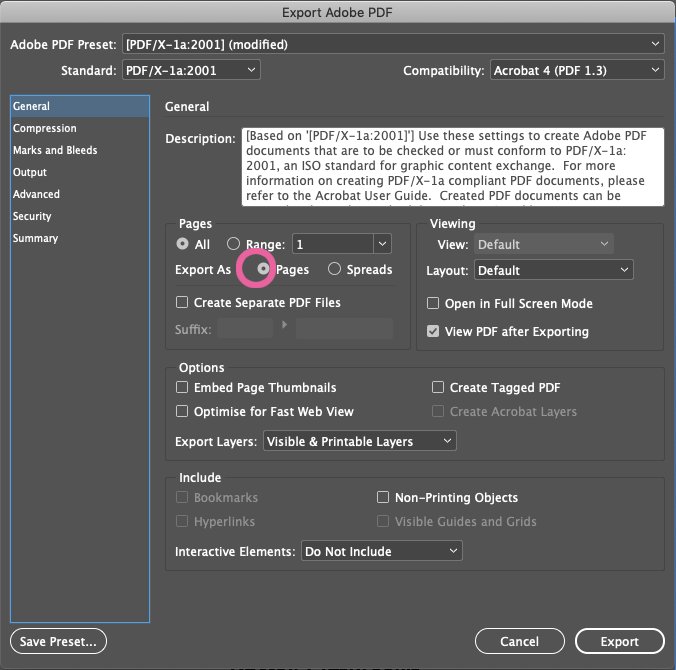
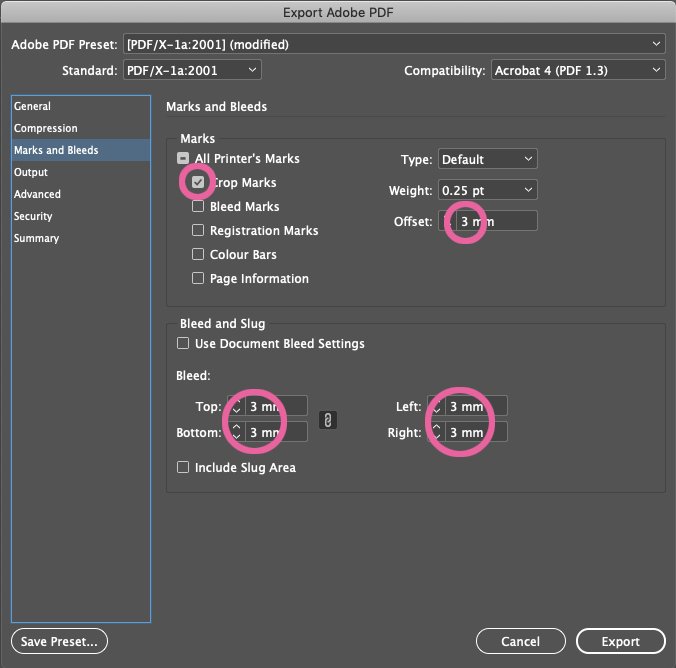
You can Save Preset to keep these settings for future use. The one preset will be available for both programs.
Photoshop — Since Photoshop does not allow for the adding of bleed to documents, you will need to include an extra 6mm to the height and width of your document (to give 3mm all around). Documents should be created to the correct size plus bleed and to a minimum resolution of 300dpi. If you are going to rasterise text or logos, we would advise working to 600dpi to retain detail.
Go to File > Save As > Format: Photoshop PDF > [PDF/X-1a:2001]. If you are working to 600dpi, click on the Compression option and select Do Not Downsample.
Apple Office
This suite of programs have never been intended for professional print purposes, and the most common issue we face is that documents are not created in standard UK sizes, such as A4. Options in these programs are extremely limited.
Pages, Numbers & Keynote — When Export To PDF, ensure image quality is Best.
Canva
The dreaded Canva of worms! If you must use Canva, the best option is to share an editable link to the artwork with us.
However, before you start, make sure your template is the correct size. In the photo below, you will see that the template name is "A5" but the size is "210 x 297 mm", which is in fact A4. Canva allows for 3mm of bleed when saving PDFs, but if we have to reduce the A4 to A5, this will also reduce the amount of bleed to just over 2mm

We also recommend changing the settings, found under File > Settings, to show rules, guides and bleed. We see so many documents where text elements have been randomly placed on the page and are not aligned, which is not a good look!
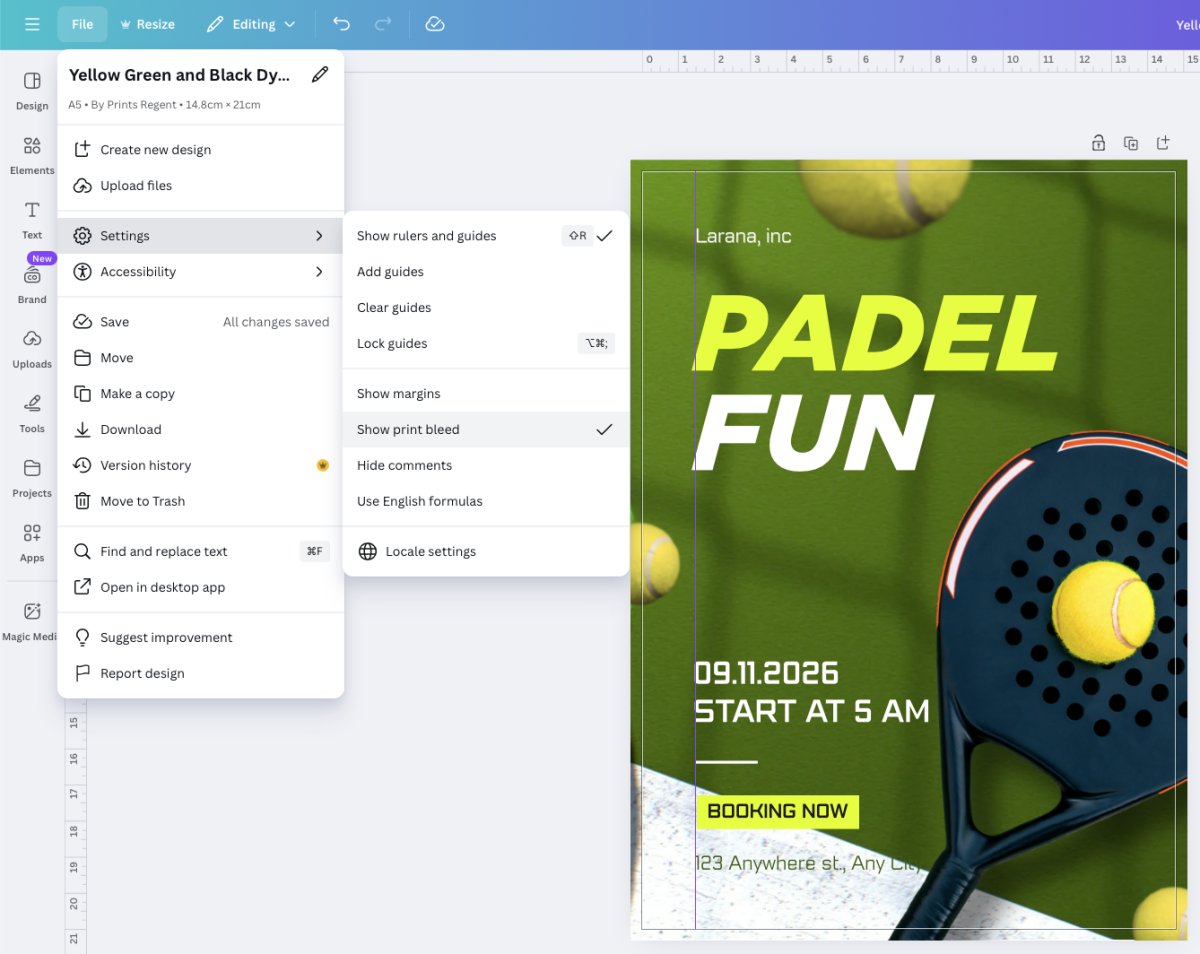
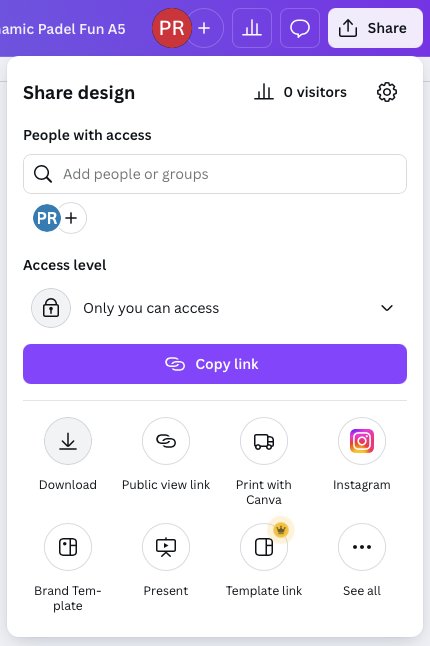
If you want to generate your own print-ready file, click on the Share button in the top right, and then Download. You can also use the Share button to send us an editable link to printed@printsregent.com and we will do the hard work for you.
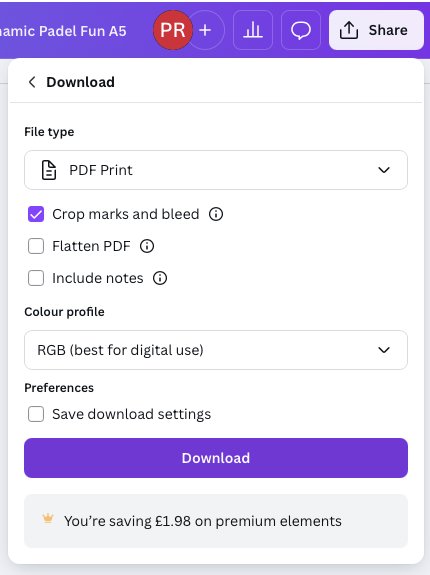
The File type should be PDF Print, and include Crop marks and bleed. There is no need to flatten the PDF or change the colour to CMYK (this is a premium option anyway). We will flatten and convert to CMYK prior to printing.
Microsoft Office 365
This suite of programs have never been intended for professional print purposes, and the most common issue we face is that documents are not created in standard UK sizes, such as A4. Word and Excel documents can be based on A4, but Powerpoint was created for screen resolutions, not page measurements. Any document supplied to us will be scaled to A4 and bleed will not be possible. Expect white margins around the edge of the page.
Word — the first step is to go to find the Options (or Preferences for Mac users). In the Print option you can select to print background colours and images depending on your document.
Word, Excel & Powerpoint — When you Save As > File Format: PDF > select Best for Printing.
QuarkXPress
The last version of QuarkXPress we used was 2021 and this is no longer compatible with our modern system. We are unable to provide instructions for this program but would recommend looking at the Adobe instructions above, and trying to match those settings as closely as you can.
For express turnarounds, we will endeavour to produce the best possible result from the file(s) supplied to us. We will not proof the file to you first, but go straight to print due to the time-sensitive nature of the work. We accept no liability for font substitution, text reflow, or any other discrepancies as a result of not supplying your file(s) in the way we have requested. Please ensure we have received both your order AND your artwork files by 3pm to qualify for next-working-day services where applicable.
Artwork can be uploaded here.